Currently working on a new modelling/texturing project; the Magpie gunship. Built mostly from imagination, its supposed to be a big futuristic heavy-armoured gunship/troop carrier type aircraft (think the love-child between an Apache and an Osprey)
Only built the basic geometry for the front end so far, with a few little areas of detail just to keep my art direction the same. Roughly 2 1/2 hours work so far. (excluding rendertimes)

Thursday, 26 May 2011

Wednesday, 25 May 2011
Traffik Tool Demo
Handed in my final submission for my Major Project on Monday. Part of the submission included having to give a presentation on the working and design behind Traffik. Included in that presentation was a video which demonstrated the tool's functionality and work flow. Here is that video.
I'm planning on redoing the video in time for a few showcase events taking place over the next few months, along with a remake of a few other shots and scenes that I've worked on over the last few years. More posts to follow, so keep watching this space.
I'm planning on redoing the video in time for a few showcase events taking place over the next few months, along with a remake of a few other shots and scenes that I've worked on over the last few years. More posts to follow, so keep watching this space.
Thursday, 19 May 2011
Traffik for Maya WIP
As explained in previous posts, I am currently working on my Traffik for Maya tool. The project is now almost complete. The construction toolset is 99% finished, and the simulation module requires only a few bug fixes and some tweaking. Below is a screenshot of the finished tBuild UI, along with a quick test network built using the tool.

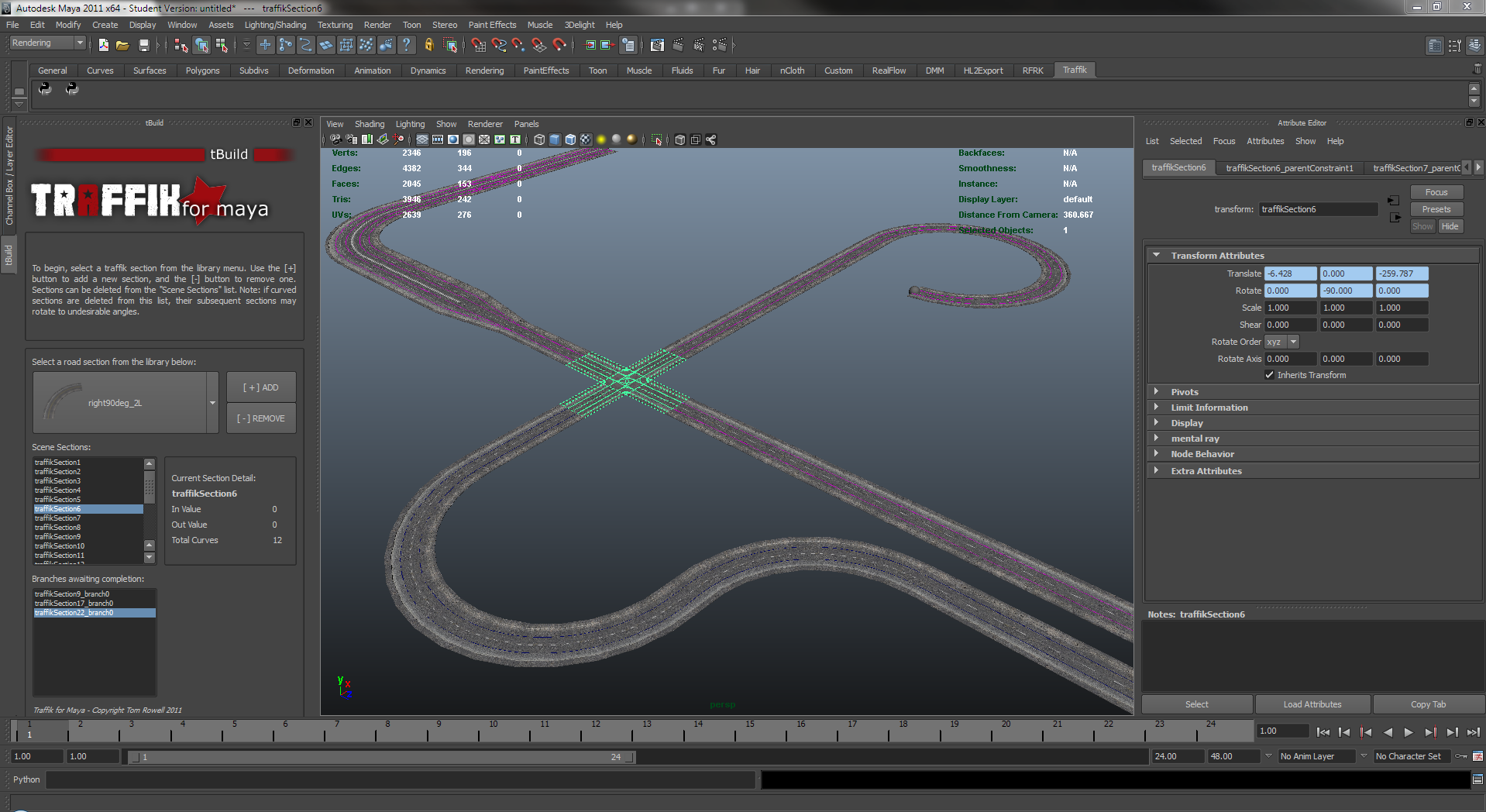
I have also created a few short video clips demonstrating the simulated traffic in action, after it has passed through tSimulate. As you can see in the video, there are unfortunately still a few issues with certain track pieces. This is mainly down to curves not existing in the right place in world-space, something easily fixed.
Saturday, 30 April 2011
Video Game Art
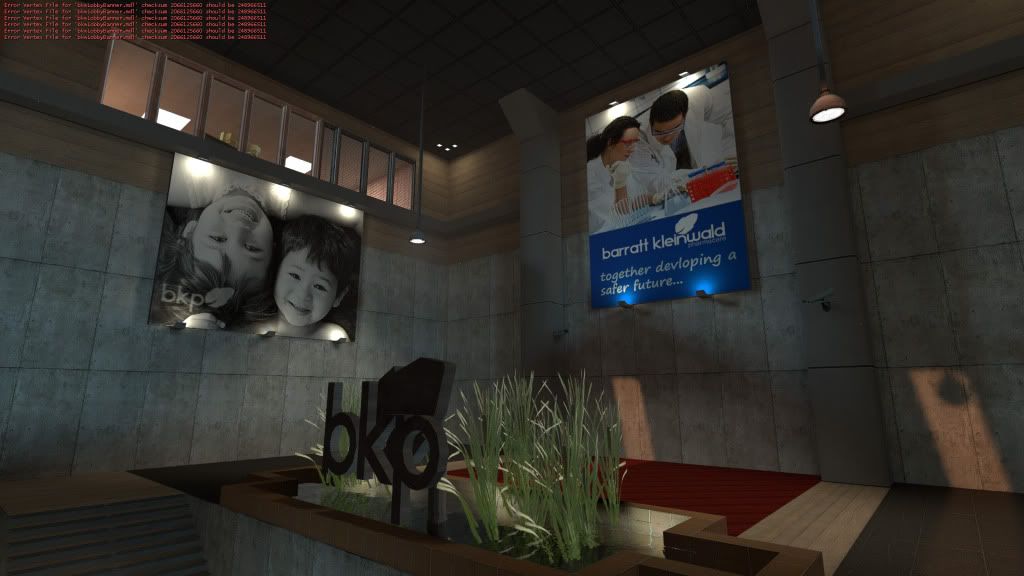
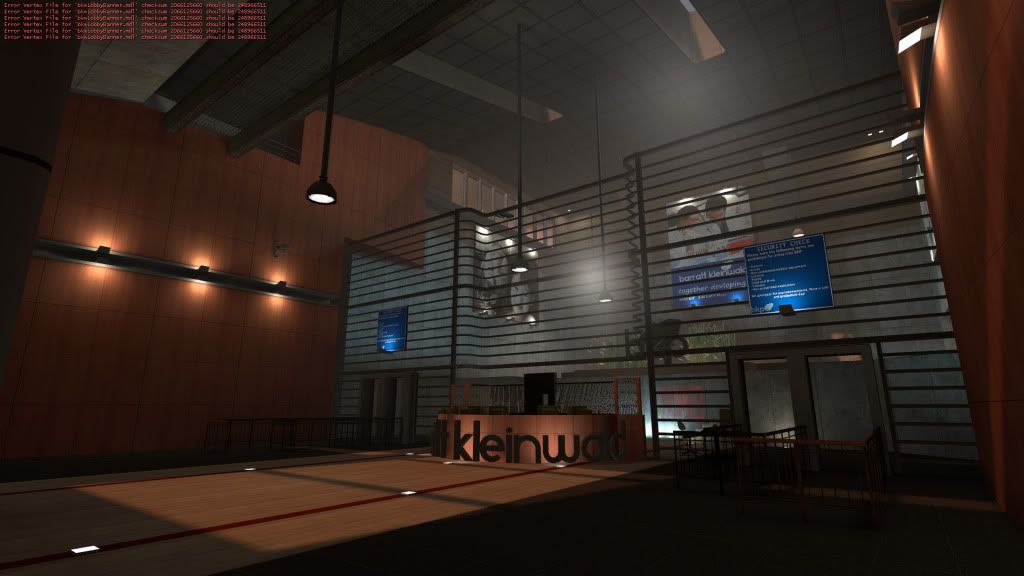
Here's a few images of some WIP game-related environment work I did a couple months ago, mainly to cure some boredom. All but one or two of the textures and models in the scene are custom built by myself, and of course all of the BSP geometry was built and lit by me.
I was sat in the opticians yesterday, waiting for my appointment. I noticed a TV with footage of the Royal Wedding on, mainly the flypast. I quite liked the helicopter angle of the Lancaster swooping across London low in the sky, and figured I'd use the shot as a template to showcase my AC130 model. Not really a final shot yet, there's still a few things I'm not happy with (the camera movement for one) but for a start it looks okay.
Traffik for Maya WIP
Here is a WIP video demonstrating my (almost) finished Collision Avoidance and Dynamic Path Detection/Selection frameworks.
In the video, the red and green cars (currently using cubes as placeholders) are configured to try and drive at 1.0 x the scene's global maximum vehicle speed (currently 10 units per second). The blue car is configured to drive slightly slower, at 0.75 of the max speed. The faster vehicles will travel at their maximum speed until they come into range of the slower vehicle, whereby they slow down until it is no longer within their 30-degree FOV, then they speed back up to their original speed.
Whilst navigating around the scene, the vehicles detect which curves begin at their current position. This enables them to detect which curve to move onto next, and in the case of branching paths, allows them to select an option at random to give the impression of conscious thought. This means when road systems are built, the user will not have to manually tell the tool which street connects to which - the vehicles will be able to automatically navigate of their own accord.
Thursday, 3 March 2011
What I am currently working on today...
# TOM ROWELL - TRAFFIK PYTHON PROTOTPYEimport maya.cmds as cmds #REMEMBER TO UNCOMMENT FOR MAYA TESTING!!import time, schedvehicles = []sceneLength = 0timeIncrement = 0.0sceneFPS = 0class Vehicle:id = 0type = 'unused'currentPath = 0nextPath = 0geometryObject = 'unused'motionPath = 'unused'ADL1 = 'unused'ADL2 = 'unused'ADL3 = 'unused'def __init__(self):self.geometryObject = cmds.polyCube()for x in range(1, 4):currentNode = cmds.createNode('addDoubleLinear')exec("self.ADL" + str(x) + " = currentNode")exec("cmds.connectAttr( \'" + self.ADL1 + ".output\', \'" + self.geometryObject[0] + ".translateX\')")exec("cmds.connectAttr( \'" + self.ADL2 + ".output\', \'" + self.geometryObject[0] + ".translateY\')")exec("cmds.connectAttr( \'" + self.ADL3 + ".output\', \'" + self.geometryObject[0] + ".translateZ\')")exec("cmds.connectAttr( \'" + self.geometryObject[0] + ".transMinusRotatePivotX\', \'" + self.ADL1 + ".input1\')")exec("cmds.connectAttr( \'" + self.geometryObject[0] + ".transMinusRotatePivotY\', \'" + self.ADL2 + ".input1\')")exec("cmds.connectAttr( \'" + self.geometryObject[0] + ".transMinusRotatePivotZ\', \'" + self.ADL3 + ".input1\')")self.motionPath = cmds.createNode('motionPath')exec("cmds.setAttr(\'" + self.motionPath + ".fractionMode\', 1)")exec("cmds.connectAttr(\'" + self.motionPath + ".xCoordinate\', \'" + self.ADL1 + ".input2\')")exec("cmds.connectAttr(\'" + self.motionPath + ".yCoordinate\', \'" + self.ADL2 + ".input2\')")exec("cmds.connectAttr(\'" + self.motionPath + ".zCoordinate\', \'" + self.ADL3 + ".input2\')")def queryVehicle(self):print ("\n==Current Vehicle Query==")print ("ID: " + str(self.id))print ("Type: " + self.type)print ("Geo Obj: " + str(self.geometryObject[0]))print ("ADL1: " + self.ADL1)print ("ADL2: " + self.ADL2)print ("ADL3: " + self.ADL3)print ("==END OF VEHICLE QUERY==\n")def attachToPath(self, path):print ("Attaching to path on curve \'" + path + "\'") # debug lineexec("cmds.setAttr(\'" + self.motionPath + ".uValue\', 0)")exec("cmds.connectAttr(\'" + path + ".worldSpace[0]\', \'" + self.motionPath + ".geometryPath\')")exec("cmds.connectAttr(\'" + self.motionPath + ".message\', \'" + self.geometryObject[0] + ".specifiedManipLocation\')")exec("cmds.connectAttr(\'" + self.motionPath + ".rotateOrder\', \'" + self.geometryObject[0] + ".rotateOrder\')")exec("cmds.connectAttr(\'" + self.motionPath + ".rotateX\', \'" + self.geometryObject[0] + ".rotateX\')")exec("cmds.connectAttr(\'" + self.motionPath + ".rotateY\', \'" + self.geometryObject[0] + ".rotateY\')")exec("cmds.connectAttr(\'" + self.motionPath + ".rotateZ\', \'" + self.geometryObject[0] + ".rotateZ\')")# reserved for future additionsdef testVariables():global currentPathprint ("Test variable is: " + str(currentPath))def initVehicle( x ):global vehiclesnewV = Vehicle()newV.id = xvehicles.extend([newV]) # add a new vehicle to the end of the listdef findVehicle( x ):global vehiclesfor v in vehicles:if v.id == x: return vdef getSceneLength():global sceneLengthglobal sceneFPSsceneLength = cmds.playbackOptions( query = True, maxTime = True ) # get max length of scenesceneFPS = cmds.currentUnit( query = True, time = True ) # get fps of sceneif sceneFPS == "game": sceneFPS = 15.0if sceneFPS == "film": sceneFPS = 24.0if sceneFPS == "pal": sceneFPS = 25.0if sceneFPS == "ntsc": sceneFPS = 30.0if sceneFPS == "show": sceneFPS = 48.0if sceneFPS == "palf": sceneFPS = 50.0if sceneFPS == "ntscf": sceneFPS = 60.0sceneLength = sceneLength / sceneFPS # generate scene time in secondsreturn sceneLength # return scene time in secondsdef runSimulation(simLength):cmds.currentTime( 0.0, edit = True)printTime()print ("Running a " + str(simLength) + " second length simulation\n")simCounter = sched.scheduler(time.time, time.sleep)runTime = simLength * 100print ("This equals " + str(runTime) + "centiseconds\n")printTime()for x in range(0, runTime):simCounter.enter(0.01, 1, doSim, ())simCounter.run()printTime()def doSim():global sceneFPSglobal timeIncrementtimeIncrement = sceneFPS / 100newSceneTime = cmds.currentTime(query = True) + timeIncrementprint newSceneTimecmds.currentTime( newSceneTime, edit = True)print "\nAdding a bit!"def printTime():currentTime = time.strftime("%H:%M:%S", time.gmtime())print currentTimegetSceneLength()runSimulation(getSceneLength())# === everything beneath this line is testing related ====# initVehicle(1)# findVehicle(1).queryVehicle()# findVehicle(1).attachToPath('curve1')# initVehicle(2)# findVehicle(2).queryVehicle()# findVehicle(2).attachToPath('curve2')# mass creation testing - comment out between tests
Friday, 14 January 2011

Sunday, 28 November 2010
Sci-Fi Work, Part II

Here is a WIP model sheet for the Jericho starship I'm modelling for the sci-fi shot. Currently only the basic blocked out mesh is complete, with some limited detailing and test textures.
Tuesday, 23 November 2010
 Currently working on a background plate for my sci-fi shot sequence. Been working on producing a convincing procedural planet shader, as well as appealing lighting and atmospherics. Managed to get something looking reasonably nice so far. Have to render out a moving sequence and find some way of tracking the sun for the lens-flares.
Wednesday, 20 October 2010
First Proper C++ Program
This is it, my first real C++ program. All it does is print pythagorean triples between 0 and 100, but I'm proud of it :D
// PythagoreanTriples.cpp : Defines the entry point for the console application.
//
#include "stdafx.h"
#include "cmath"
float calculateHypot(int a, int b) // calculates square root of a^2 + b^2
{
float c;
c = ((a*a)+(b*b));
return sqrt(c);
}
bool checkInteger(float a) // subtracts int-cast version of c from c to determine if integer
{
if(a-(int)a != 0) return true; // if floating value, return true
return false; // if integer value, return false
}
int _tmain(int argc, _TCHAR* argv[])
{
printf("***********************\n");
printf("* PYTHAGOREAN TRIPLES *\n");
printf("***********************\n");
int a;
int b;
//printf("The result is: %f", c);
for (a=1; a <= 100; a++)
{
for(b=1; b <= 100; b++)
{
float c = calculateHypot(a,b);
bool isInt = checkInteger(c);
if(isInt != true) // kinda reverse of what you'd think, but it only seems to work this way
{
int intC = int(c); // purely for display purposes - changes C into an integer value to cull trailing 0s
printf ("a = %d b = %d c= %d\n",a,b,intC);
}
}
}
}
Sci-Fi Work

Currently working on a sci-fi scene, mainly to test my own modelling/texture skills, as well as lighting large scenes. There's also plans to work up a reliable destruction pipeline, something I've been meaning to do for a while. Here's a random screenshot of the main starship in the scene. I'm currently remodelling and retexturing it, so I'll post some updates as and when that happens...
Subscribe to:
Posts (Atom)